01
Three kinds of timer
A stopwatch that counts up, a countdown timer that can repeat, and a countdown to a specific date & time.
Free macOS App
Run many timers at once — stopwatches, countdown timers, and deadlines — stacked in one small, always-on-top panel for your Mac.
Signed & notarized by Apple · Free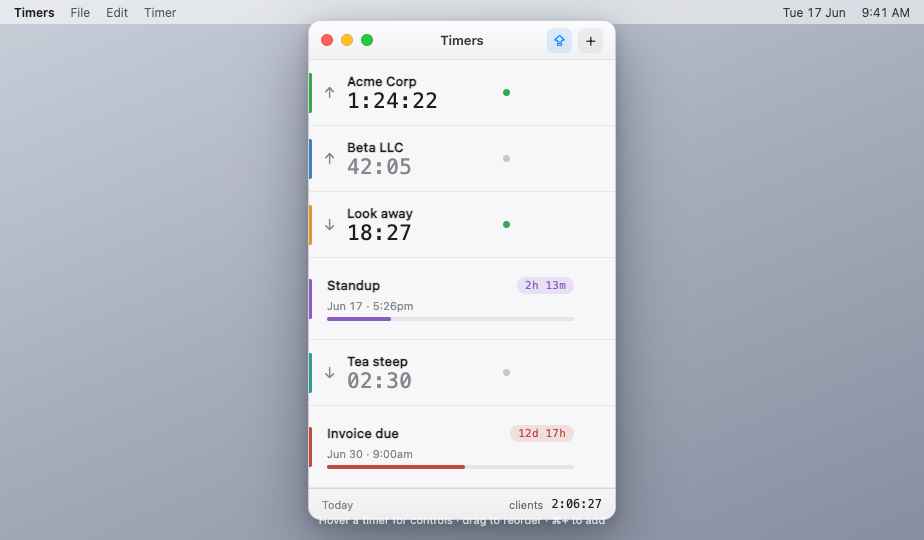
One compact panel holds as many timers as you need — each on its own row with a name, color tag, live time, and its own controls. The window floats above your other apps, and you can tuck it into the menu bar when you don’t need it.
Times are anchored to the clock, so they stay accurate across quits, restarts, and sleep — and the app keeps itself up to date automatically.
What it does
A stopwatch that counts up, a countdown timer that can repeat, and a countdown to a specific date & time.
A floating panel that stays visible while you work, with a menu-bar icon to show or hide it instantly.
Tag stopwatches into groups — say, one per client — and the footer totals each group’s time for you.
Follows your system appearance, or pick Light or Dark yourself in Preferences.
Checks for new versions and updates in place — every build is signed and notarized by Apple.
Everything stays on your Mac. No account, no sign-in, no tracking, nothing sent anywhere.
Grab Multi-Timer.dmg and open it.
Drop Multi-Timer onto the Applications folder, then eject the disk image.
Open it from Applications — no security warning — and look for the ⏱ icon in your menu bar.
Free under the MIT license. Allow notifications when asked to get timer-completion alerts.